SEO, accessibility and AI search: the shared foundations every website needs
The overlap between SEO and accessibility is bigger than most people realise, and acting on it is simpler than you'd think.

I’ve lost count of the times I’ve heard SEO and accessibility talked about like they live on different planets. Marketing looks after the rankings, the devs look after compliance, and never the twain shall meet. But they’ve always wanted the same thing: a website that’s easy to find, understand and use. And now AI search wants it too.
If you’ve listened to me talk about SEO and accessibility before, you’ll recognise the shop analogy coming up, but stick with me! The rest of the article is brand new.
First: the locked door
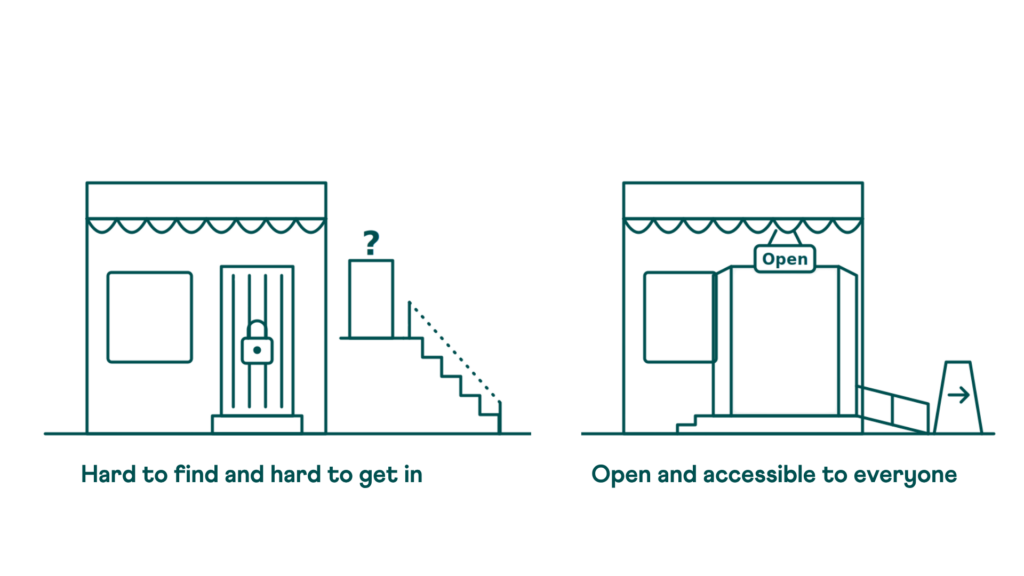
Imagine you’re heading to a shop, ready to spend your hard-earned cash. But the front door’s locked.
No worries, there’s a side entrance. Except it’s hidden up some rickety stairs, with zero signage. You eventually find it, squeeze in, and now you’re inside the shop feeling vaguely silly and frustrated. You probably won’t come back.
That’s how a lot of websites make their users feel, every single day. If people can’t easily find and navigate your site, the stuff they want is technically there, but getting to it is so much work that they give up and go elsewhere.
The neon sign and the welcoming shop
SEO is the big neon sign that helps people find your shop in the first place. It’s what you do to make sure search engines notice you, understand what you’re about, and rank you higher. Think of it as the red carpet for crawlers.
Accessibility is the shop that gets it. The one with the ramp and the stairs, doors that open properly, wide aisles, clear signs, calm music and relaxed lighting. It’s about making sure everyone can navigate and enjoy what’s inside, not just some people.
But spoiler alert, this is the bit people miss: the neon sign and the welcoming shop are actually the same renovation project.
Everyone needs the ramp sometimes
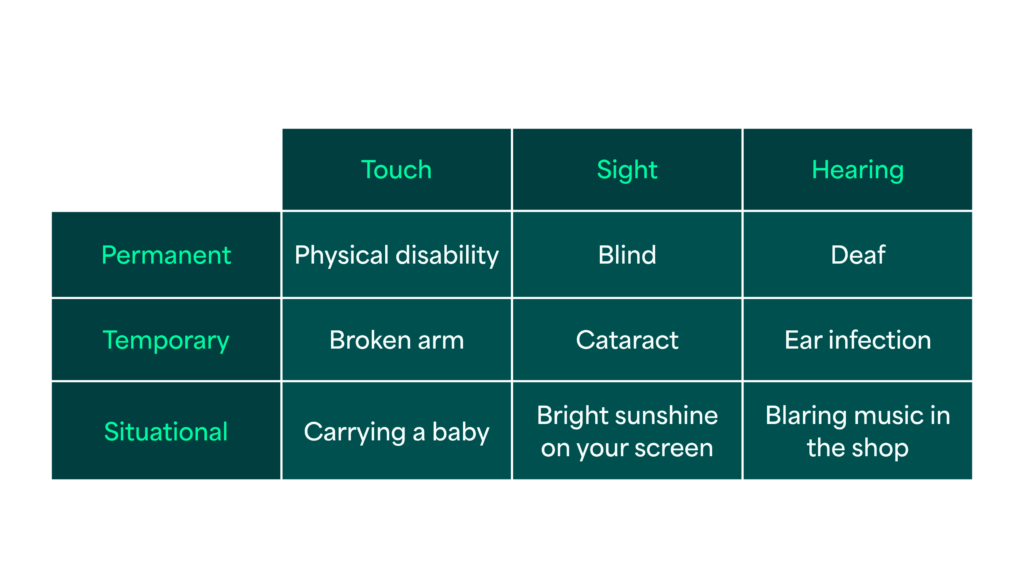
People with accessibility needs aren’t a fixed group of ‘other people’. It’s important to remember they might have permanent, temporary, and situational needs, and everyone moves between those categories throughout their life.
A new parent with a baby in one arm is suddenly a one-handed user. Someone trying to read their phone in bright sunshine has a temporary vision impairment right now. Anyone in a loud pub trying to follow a video without headphones needs captions immediately.
That last one is me, pretty much all the time. I have Obscure Auditory Dysfunction (OAD), which means I struggle to hear when there’s background noise, so I do a lot of lip reading. I didn’t realise quite how much until we all started wearing masks during COVID! And I watch EVERYTHING with captions.
When we make things easier for the people who need it the most, it usually ends up better for everyone else too.
There’s a name for this: the curb-cut effect. In 1970s Berkeley, wheelchair users fought to get kerbs cut into pavement ramps, and some activists literally poured their own concrete at night. Once those ramps were in, everyone used them: prams, delivery trolleys, suitcases, skateboards.
The numbers
- 1.3 billion people worldwide (16% of the population) experience significant disability
- £446 billion a year is the spending power of disabled households in the UK, known as the Purple Pound
- Up to 1 in 4 US adults have some type of disability
That’s not a niche – that’s a huge market. And that’s before you count the temporary and situational columns, which are basically everyone eventually. This is really helpful to remember when you’re making the business case for these “renovations”.
Where SEO and accessibility overlap
Search engine crawlers can’t see your gorgeous window display. They experience your website the same way a screen reader does: through structure and text, with no access to visuals, layout, or vibe. So when you make something properly accessible, you’ve made it crawlable too. Two jobs for the price of one – love that for you.
Colour contrast
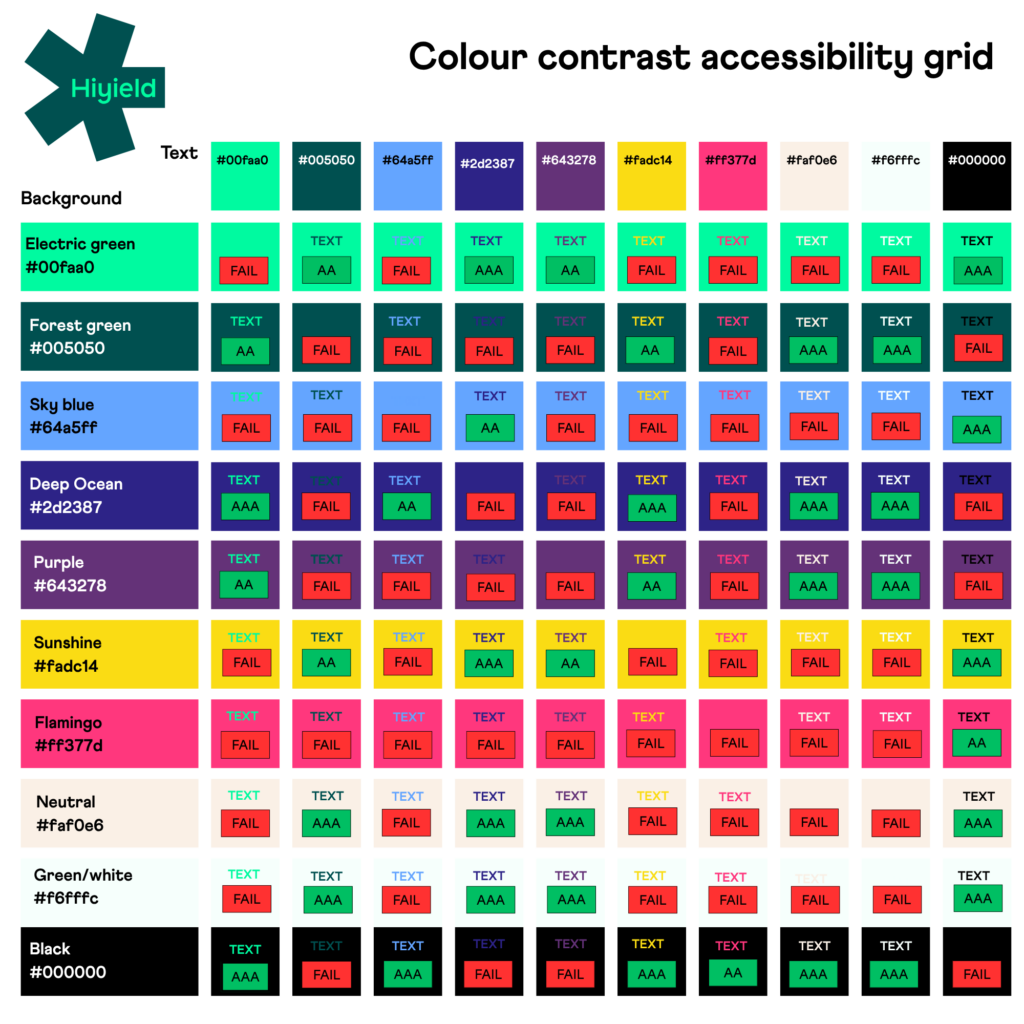
One of the most visible failures on the web. When text doesn’t have enough contrast against its background, people with low vision, colour blindness, or even just a glare on their screen can’t read it. And when they leave, your bounce rate quietly tells search engines the page didn’t deliver. The fix is the same either way: check your combinations, build a palette guide for your team, and stop guessing. Here’s ours as a handy example.
Alt text
This is where a lot of sites phone it in. A screen reader user depends on alt text to understand what an image is communicating, not just that it exists, but what it means in context. Search engines are in the same boat. “Image of a graph” tells nobody anything. One rule of thumb: if your alt text couldn’t stand alone without the surrounding paragraph, it’s not done yet.
Transcripts and captions
Arguably the most underused dual-purpose tool in the content kit. For anyone who’s deaf or hard of hearing, or watching a video where audio isn’t possible, they’re essential. (Hi, me again!) For search engines and AI tools, they transform invisible audio and video into indexable, citable text. A podcast episode without a transcript is unreadable by anything that can’t hear it, which is a lot of things.
Link text
This is where “click here” goes to die, and rightly so. Screen reader users often navigate by jumping between links, and a list of “click here, click here, click here” is genuinely useless. Search engines use anchor text to understand what’s on the other side of a link, so vague text wastes a ranking signal too. There’s no version of this where “click here” wins.
Page structure and navigation
Headings in the right order, consistent menus and predictable layouts reduce cognitive load for users with processing differences, memory difficulties, or anyone who just wants to find something quickly. They also give crawlers a clear map of your content hierarchy. A scrambled heading structure is confusing for a human and genuinely problematic for a search engine.
Plain language
Possibly the most democratising thing you can do on a website. Around 1 in 6 adults in England have very poor literacy skills. That’s not a criticism of anyone. Reading on screens is hard, especially when people are busy, tired, or not reading in their first language. Short sentences, no jargon, and clear structure: better for users with cognitive differences, better for non-native speakers, better for engagement, better for rankings.
AI: the new customer on the high street
Now let’s say hello to the new customer walking down the high street: AI search. We’re talking about Claude, ChatGPT, Gemini, and Perplexity who are changing the way people search and reach our websites – and let’s not forget AI Overviews!
Is your website AI ready? McKinsey estimates 20-50% of traditional search traffic is at risk for brands that aren’t prepared for AI-driven search. And it’s no longer one shopper. ChatGPT still leads with around 53% of generative AI web traffic, but Gemini has passed a quarter and Claude is the fastest-growing platform in the category (Similarweb, 2026). That’s not a trend to watch. That’s the high street being redeveloped while we’re standing on it.
AI reads your site the same way a screen reader does. Structure, text, and clarity. No window display. No vibes.
Think of it as a personal shopper. It walks the whole high street on someone’s behalf, picks the clearest, most useful shops, and reports back with recommendations. If your door’s locked or your signage is chaos, the personal shopper just walks on to the next shop. No complaint or feedback. You never even know they were there.
You might have heard people (AKA me) say AI search is just good old, traditional SEO wearing a moustache. And I stand by it. The foundations are the same, which is exactly why this stuff matters so much. But there’s also a bit more to AI visibility than just the basics; if the foundations aren’t there, nothing else sticks.
The personal shopper’s checklist
This framework comes from Siteimprove’s Structure, Meaning, Clarity playbook, and it’s a useful way to hold the whole thing in your head.
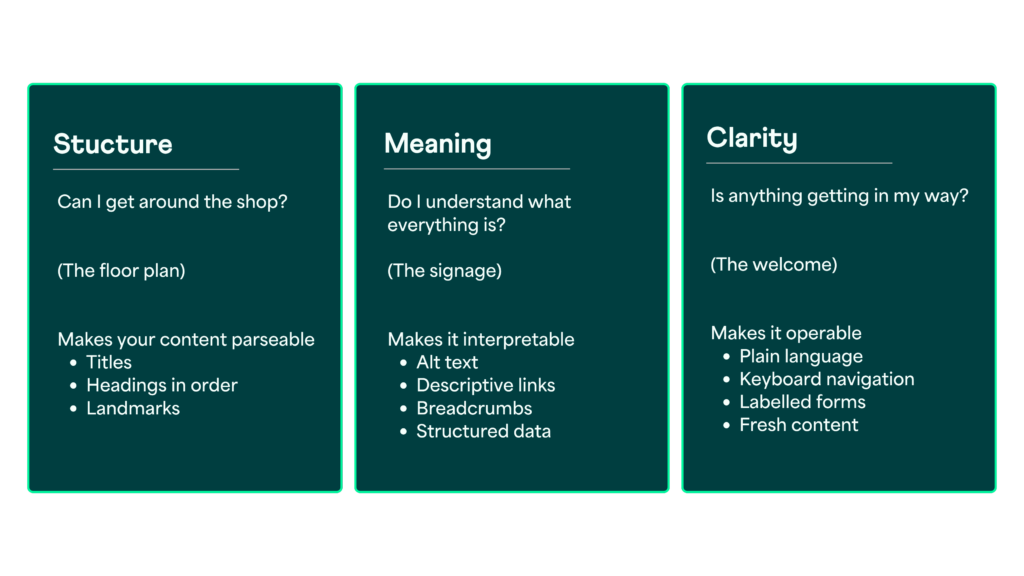
Structure is the floor plan
Honest page titles, headings in order, and landmarks that declare “this is the nav, this is the main content, this is the footer”. CSS can make things look like they’re in the right place, but screen readers and AI walk the aisles in code order. If the code says tills first, stockroom second, entrance last, that’s the shop they experience.
Meaning is the signage
Alt text that stands alone, descriptive links, breadcrumbs (a cheap, high-signal answer to “where does this page belong?”), transcripts, and structured data, which is literally telling AI what your content is in a vocabulary it already understands.
Clarity is the welcome
Plain language, keyboard navigation, visible focus states, labelled forms, and content that’s genuinely up to date. Stale content quietly tells every reader, human, assistive or artificial, “maybe this isn’t true anymore.”
Here’s the reframe that makes it all click: accessibility isn’t a bonus layer you add on top of technical SEO. It’s what technical SEO looks like when you actually take the machine-readable layer seriously.
One renovation, three payoffs
- A better experience for every user, including users with disabilities, mobile users, users on slow connections, and the growing number of people using voice interfaces and assistive technology.
- Better search rankings, because the ingredients of accessibility are the ingredients of SEO. They’ve always been the same list.
- More AI citations, because AI tools cite the clearest, most structured, most trustworthy sources they can parse. If that’s you, you get recommended. If it isn’t, the personal shopper walks on.
The legal layer is worth knowing about too. In the UK the Equality Act 2010 applies to websites; in the US it’s the ADA; across the EU the European Accessibility Act now applies. WCAG 2.2 AA is the latest standard, with 2.1 AA as the minimum they all point to. Retrofitting an inaccessible site is often estimated to cost around ten times more than building it right from the start. The cheapest accessible shop is the one built with the ramp already in the plans.
What this means for your role
This isn’t just for one team or one discipline. Wherever you sit in a digital project, you’re holding one of the keys.
If you build it
Semantic HTML is the floor plan: real headings in order, real buttons, landmarks that say what each region is. Test everything with just a keyboard before you ship. AI agents are now navigating websites on people’s behalf, which means the Tab key matters for humans and robots. ARIA is the label maker for when a door genuinely needs a sign, but if you’re labelling everything, the shop was probably built wrong in the first place.
If you design it
Contrast-check every combination and make yourself a cheat sheet for each project. Never rely on colour alone to convey meaning; pair it with an icon or a word. Design your focus states and your error messages rather than leaving them to browser defaults. “Something went wrong” is a shop assistant shrugging at you. Say what went wrong and how to fix it.
If you write for it
Put alt text on every image, and captions and transcripts on every video. Use plain language: one page, one meaning. Write descriptive links. Add breadcrumbs. Keep your content fresh. Use #CamelCase on hashtags so screen readers announce each word instead of reading an alphabet smoothie.
Everything on this list is an accessibility task, an SEO task, and an AI visibility task. There’s no second to-do list.
If you scope or sell it
Bake accessibility in from the start, never as a bolt-on. The Tesco story is the one to keep in your pocket: back in the early 2000s, they spent £35k on accessibility improvements and unlocked an audience spending £13 million a year. When a client winces at an accessibility line item, that’s the number. The pitch isn’t just “it’s the right thing to do”, though it is. It’s “it makes your site easier to find, more likely to be recommended by AI, and it costs less now than it will later.”
The take-home list
You can’t do all of this overnight, and that’s fine. Incremental improvements compound. Here’s where to start:
- Structure your content with a clear heading hierarchy
- Test a page using only a keyboard
- Check your colour contrast
- Label your forms clearly and write helpful error messages
- Add alt text to every meaningful image
- Add captions and transcripts to every video and podcast
- Use descriptive link text
- Add breadcrumbs
- Make sure your content is mobile-friendly and touch-friendly
- Keep things up to date
Notice there’s no separate AI section on that list. That’s the whole point. Structure, meaning, clarity. Floor plan, signage, welcome. It was already in here.
The high street is changing
Not everyone is your target audience…but everyone should be welcome on your site. An accessible website is a better website: for the person using a screen reader, for the person on a dodgy mobile signal in a rural area, for the search engine trying to understand your content, and for the AI tool deciding whether to recommend you. Same checklist, done once, and done properly.
If you only do one thing after reading this, pop your mouse in a drawer for five minutes and try getting round your own website with just a keyboard. It’s properly eye-opening, and it’ll tell you more than any audit report. Then give us a shout, and we’ll help with the rest 🖤
Want a hand working out where your site stands? Get in touch about an accessibility and SEO audit
FAQs
Does accessibility improve SEO?
Yes. Search engines and screen readers both read your site as structure and text, not visuals. Clear headings, descriptive alt text, meaningful link text and plain language help people with disabilities navigate your content and help search engines understand and rank it. It’s one piece of work with two payoffs.
Where can I learn more about SEO?
Check out our free SEO for humans guide, which gives you a jargon-free introduction to the world of Search Engine Optimisation.
Does accessibility affect AI search visibility?
It does. AI tools like ChatGPT, Claude, Gemini and Perplexity parse websites in the same way screen readers do: through the code order, headings, alt text, transcripts and structured data. Accessible, well-structured sites are easier for AI to understand and therefore more likely to be cited or recommended.
What is the curb-cut effect?
The curb-cut effect describes how design made for people with disabilities ends up benefiting everyone. Kerb ramps were fought for by wheelchair users but are now used by people with prams, suitcases, delivery trolleys and bikes. The same is true online: captions help people in noisy pubs, high contrast helps people in bright sunlight, and plain language helps everyone.
What accessibility standard do UK websites need to meet?
The Equality Act 2010 applies to websites in the UK. WCAG 2.2 AA is the latest standard, and 2.1 AA is the minimum most organisations and legal frameworks point to. Public sector bodies have specific legal requirements; private sector organisations are expected to make reasonable adjustments, which in practice means aiming for WCAG 2.1 AA.
Where should I start if my website isn’t accessible?
Start with the things that help the most people fastest: fix your heading hierarchy, check colour contrast, add alt text to images, test a key page using only a keyboard, and rewrite any “click here” links. Each of these improves accessibility, SEO and AI visibility at the same time.
Is accessibility expensive to add to an existing website?
It’s cheaper to build in from the start than to retrofit, but incremental improvements are still worth it and compound over time. Tesco’s often-cited example saw a £35k accessibility investment unlock around £13 million a year in sales. Accessibility is an investment in reaching more people, not a cost centre.



Let’s get started!
Great digital products aren’t just built, they’re co-created. Together, let’s breathe life into your idea, crafting solutions that stand out.
Contact